
Reasons for Different Results in SmartPLS 4
SmartPLS 4 results can differ from those of SmartPLS 3. The cause is usually the data import, an updated algorithm, the settings used in SmartPLS 4, or a combination of these. Check the points below in order.
The data file is not set up correctly
If your data file is shown in red, it is not set up correctly.
- Double-click the data file to open its setup.
- Check the delimiter, escape character and locale.

Missing values are not marked
SmartPLS 3 used a placeholder string (e.g., -99) to mark missing values in the dataset. When you import a new data file or open a data file from a SmartPLS 3 project, apply the same marker in the data file setup dialog of SmartPLS 4. SmartPLS 4 then replaces all values with this marker by an empty value.

Missing values are treated differently
If your dataset has missing data, SmartPLS 4 may use no missing value treatment or a different one than your SmartPLS 3 analysis. When you run an algorithm, select the same missing value treatment you used before.

Indicator scales are not set up correctly
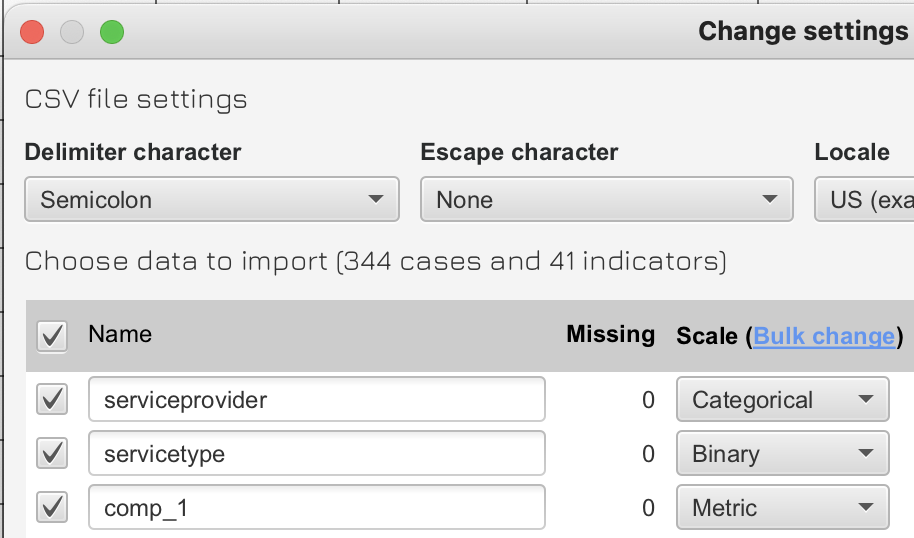
SmartPLS 3 only considered metric data. If you used a binary variable for two categories (e.g., gender), SmartPLS 3 treated its values 0 and 1 (or 1 and 2) as a metric scale. SmartPLS 4 lets you assign the correct scale to each variable and adjusts the computations accordingly.
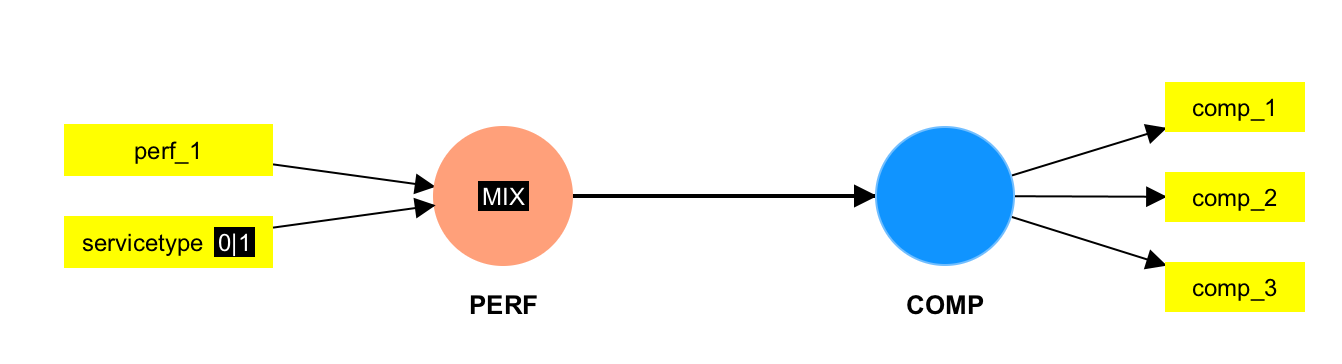
The scale settings can also make your model invalid. For example, SmartPLS 4 cannot compute results for models that have binary and categorical variables in certain parts of the model (e.g., in reflective measurement models together with metric variables).
Results are not standardized
SmartPLS 3 always produced standardized results. In the PLS-SEM algorithm dialog of SmartPLS 4, check Type of results: if it is set to “Unstandardized” or “Mean centered”, change it to “Standardized”.

Binary predictors are no longer standardized
Why SmartPLS 4 changed this
In SmartPLS 3, all variables and constructs were automatically standardized, including binary variables. Standardized binary predictors are difficult to interpret and require manual unstandardization to obtain meaningful results:
- The effect of a standardized binary variable does not represent a change from one category to the other. It is an abstract difference between categories scaled by the standard deviation, which depends on the prevalence or group proportion of the categories in the sample.
- Standardized binary variables used as moderators create additional interpretation problems, because the reference point (zero) is the mean of the variable. The mean of a binary variable does not represent either category. The estimated conditional effects are therefore not representative of either category but some probability-weighted average in between.
What SmartPLS 4 does instead
SmartPLS 4 keeps binary variables and constructs unstandardized (dummy-coded as 0/1). The resulting coefficients are partially standardized: they represent the effect of a category change, specifically the effect of the category coded “1” compared to the reference category “0”, in standard deviations of the outcome (dependent variable).
For example, an effect of 0.4 for a binary variable means a change of 0.4 standard deviations in the outcome variable when changing from the reference category “0” to the other category “1”.
To obtain the “old” SmartPLS 3 results, define your binary variable as metric in the data file setup.
Further reading: Becker, J.-M., Cheah, J. H., Gholamzade, R., Ringle, C. M., & Sarstedt, M. (2023). PLS-SEM's most wanted guidance. International Journal of Contemporary Hospitality Management, 35(1), 321–346.
Mean replacement is not applied to binary data
Since SmartPLS 4.1.1.5, mean replacement is no longer applied as missing value treatment in models that contain binary indicators.
Why
Mean value replacement assumes that a variable is metric: its values have quantitative meaning and the mean is a valid measure of central tendency. Binary indicators represent categorical information (e.g., yes/no, present/absent, female/male) and have no meaningful average. Replacing missing binary values with a mean (e.g., 0.35 or 0.62) would introduce non-binary, uninterpretable values into the dataset. To avoid such problematic imputations and potential bias, SmartPLS automatically disables mean replacement for binary variables.
Reproduce earlier results
If your binary variables were originally meant to be treated as metric variables, you can reproduce the earlier results:
- In the Workspace view, double-click your dataset.
- In the data table, find the relevant variables.
- Change the Scale Type from Binary to Metric.
- Save your changes.
- Run your model again.
This enables mean value replacement as in SmartPLS 3 and reproduces the earlier results. However, a binary variable defined as metric is standardized before model estimation, which brings back the interpretation problems described in binary predictors are no longer standardized. SmartPLS 4 does not standardize variables coded as binary and codes them as 0/1 dummy variables, so path coefficients remain interpretable when binary data are included.
For how to manually adjust coefficients (and the corresponding bootstrap confidence intervals) when you treat binary variables as metric, see:
Becker, J.-M., Cheah, J. H., Gholamzade, R., Ringle, C. M., & Sarstedt, M. (2023). PLS-SEM's most wanted guidance. International Journal of Contemporary Hospitality Management, 35(1), 321–346.